Anchor Alarm on Apple Watch: Watch Your Boat From Your Wrist
The best anchor watch is the one you actually check. And nothing is easier to check than a glance at your wrist. Safety Anchor Alarm now runs on Apple Watch, putting your safe radius and your distance from the anchor right where you can see them — no phone to unlock, no screen to wake, no fumbling in the dark. This guide explains what the watch shows, how it works alongside your iPhone, how to read the display at 3 a.m., and why keeping watch from your wrist is the quietest, most reliable way to sleep at anchor.
Why an Anchor Alarm Belongs on Your Wrist
An anchor alarm has one job: to reassure you that your boat is where you left it, and to raise the alarm the instant it isn't. The trouble is that the reassurance part happens dozens of times a night. You half-wake, you wonder, and then you face a choice — get up, find the phone, wake the screen, wait for it to focus, read the number, put it back — or just lie there uneasy and try to fall back asleep.
Neither is good. The first breaks your sleep and often a partner's too; the second leaves you anxious. A wrist display removes the choice entirely. You lift your arm a few centimetres, the watch shows you a circle with your boat comfortably in the middle, and you are asleep again before you were properly awake. The friction of checking drops to almost nothing — which means you actually check, which is the entire point of keeping watch.
What the Apple Watch Shows You
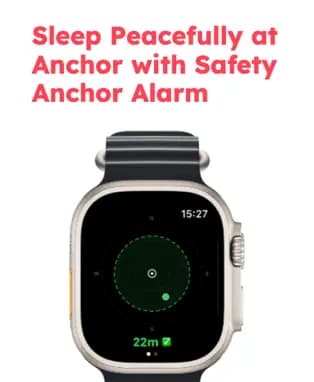
The watch face is deliberately simple, because at anchor you want an answer, not a dashboard. At a glance you see:
- Your safe radius — drawn as a circle, the same swing zone you set on the phone. This is the boundary that separates “normal swinging” from “something is wrong.”
- Your boat's position inside it — a dot that moves in real time as your boat swings on its rode, so you can see at once whether you are sitting central or edging outward.
- Your current distance from the anchor — the live number in metres, e.g. 22m, so you know exactly how much room you have before the radius is reached.
- A green or red safety indicator — green while you are inside the safe zone, red the moment you cross it. Colour is the fastest signal a tired brain can read.
That combination answers the only two questions that matter in the night — am I safe? and how much margin do I have? — in the time it takes to turn your wrist.
How It Works With Your iPhone
It helps to understand the division of labour. Your iPhone does the monitoring. It has the strongest, most power-efficient GPS, it sits plugged in with a clear view of the sky, and it runs the continuous background tracking that actually watches your position all night. If you want the detail on that, our guide on GPS accuracy for anchor alarms explains why phone GPS is more than accurate enough for the job.
Your Apple Watch is the readout and the alert. It mirrors the phone's live status on your wrist and taps you if anything changes. This split is what keeps the system reliable: the device best suited to tracking does the tracking, and the device best suited to being noticed does the noticing. You can see both the watch app and the full iPhone experience on our features page.
Reading the Display: Green Means Sleep, Red Means Move
The design leans on colour because colour survives sleepiness. Two states, two meanings:
- Green — inside the safe radius. The dot sits within the circle and the distance number is comfortably below your radius. Your boat is swinging normally on its rode. Go back to sleep.
- Red — beyond the safe radius. The distance has grown past the boundary and the watch has turned red and tapped your wrist. This is the fingerprint of a possible drag: a sustained move in one direction that keeps growing. Time to get up and look.
A single high reading isn't the same as dragging — GPS wanders a metre or two even when you're stationary. What you're watching for is the trend: the distance climbing steadily and not coming back. If you want to recognise real dragging with your own eyes as well as your wrist, our guide on how to tell if your anchor is dragging walks through the warning signs.
Setting It Up
The workflow is the same easy routine as the iPhone app, with the watch simply coming along for the ride:
- Drop and set your anchor as normal, and let the boat settle back on its rode.
- Arm the alarm on your iPhone once the boat is sitting quietly — this marks the centre of your swing circle.
- Set your safe radius to cover your whole swinging circle plus a margin. As a rule of thumb, that's your deployed rode length plus your boat length plus a few metres for GPS noise; our anchor scope calculator gives you the rode and swing figures to base it on.
- Raise the app on your wrist and confirm you see the green circle and your live distance. That's it — you now have anchor watch on your wrist all night.
Keep the iPhone plugged in and somewhere with a clear view of the sky. A dead phone is a dead alarm — on any device.
Who Benefits Most
A wrist display quietly changes the experience for a few groups in particular:
- Solo sailors. When you're the only watch aboard, the ability to check without fully waking is the difference between real rest and a broken night. Pair this with our solo sailor anchor safety guide for the full single-handed routine.
- Couples and families. A glance at the wrist doesn't light up the cabin or wake the person beside you. One person can keep an easy watch while everyone else sleeps.
- Light sleepers. A haptic tap on the wrist is a gentler, more certain wake-up than a sound you might sleep through — or a phone across the cabin you won't hear.
Battery and Reliability
Two honest notes so the wrist watch stays trustworthy. First, the phone is still the anchor of the system. Keep it charged and aboard — the watch is a companion display, not a replacement for the phone's monitoring. Second, charge your watch before bed if it's low. An Apple Watch happily lasts a night, but arriving at the anchorage on 5% defeats the purpose. Treat “top up the watch” as part of your evening routine, right alongside plugging in the phone.
For the complete overnight checklist — lights, snubber, watch rotation and more — our night anchoring safety tips tie it all together.
The Bottom Line
An anchor alarm only protects you if you trust it and use it, and both come down to how effortless it is to check. Putting your safe radius and your distance from the anchor on your wrist removes the last bit of friction: no unlocking, no bright screen, no getting up. You glance, you see green, you sleep — and if the circle ever turns red, a tap on the wrist gets you on deck before a dragging anchor becomes an emergency. If you want that quiet watch-keeper on your wrist tonight, Safety Anchor Alarm is free to download for iPhone, iPad and Apple Watch.

Safety Anchor Alarm
GPS-powered anchor monitoring for iPhone, iPad and Apple Watch. See your safe radius and distance from the anchor at a glance — and get a tap on the wrist the moment your boat starts to drag.
Download Free