Starlink on a Boat: Maritime Plans, Power Draw and the 12-Mile Rule
Five years ago internet on a cruising boat meant a local SIM in every country and a satellite phone for the crossing. Now a dish the size of a laptop on the stern rail gives a video call from a bay with no mobile signal, and the question has moved from “can I get online” to “which plan, how much battery, and what happens past 12 miles”. Starlink changed its boat plans in late August 2026, so most of what was written about it before September is now out of date. This is the current picture: the new Personal Maritime plan against Roam, what Ocean Mode costs, Mini against Standard, the energy budget in amp-hours, and where it fits next to the alarm watching your anchor.
The short answer
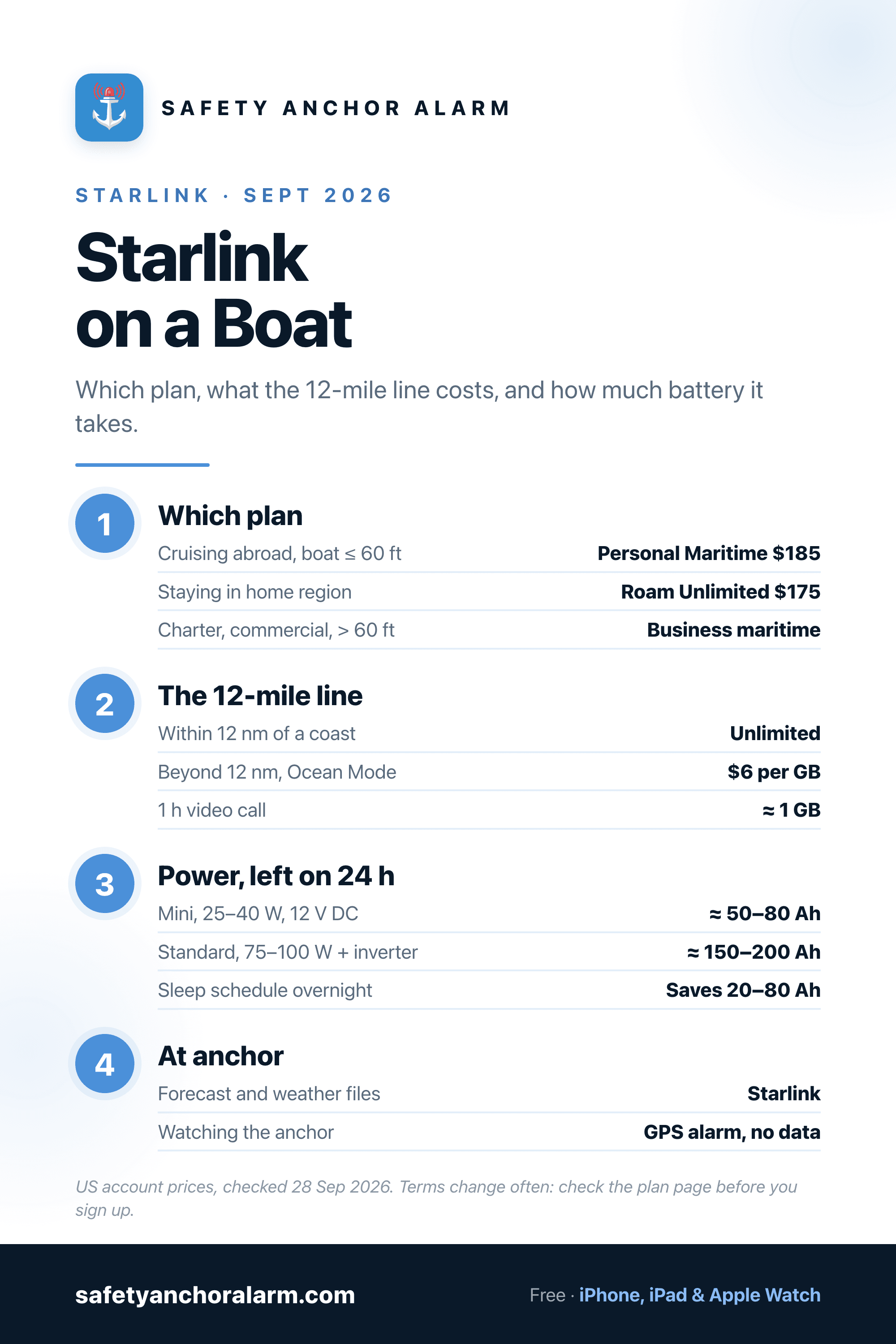
For a private boat of 60 ft or less that crosses borders, the Personal Maritime plan ($185 a month on a US account) is the one built for you: unlimited data within 12 nautical miles of any coast, no 30-day limit abroad, and Ocean Mode at $6 per GB beyond that. If the boat stays in its home region, Roam Unlimited ($175) is cheaper but capped at 30 consecutive days abroad. Most sailboats should fit a Starlink Mini: 25–40 W on 12 V DC with no inverter, about 50–80 Ah a day if left on. Put it on a sleep schedule overnight. Your anchor alarm does not need it; GPS works with no internet.
The Starlink Boat Plans Side by Side
US account prices as checked on 28 September 2026. Prices in euros, pounds and other currencies differ by country, and Starlink changes these terms often; check the plan page before you sign up.
| Plan | Price | Within 12 nm | Beyond 12 nm | Time abroad | Built for |
|---|---|---|---|---|---|
| Personal Maritime | $185/mo | Unlimited in territorial waters worldwide | $6 per GB | None abroad, unless local rules require it | Private boats up to 60 ft cruising between countries. Registration papers required. |
| Roam Unlimited | $175/mo | Unlimited, on land and on water | $6 per GB (from 27 Sep 2026; was $2) | 30 consecutive days outside your home region | Boats that stay in one country or region, or split the year between boat and van. |
| Business maritime / Priority | Business pricing | Priority data, land and sea | Included in the data pool | None | Charter, commercial, crewed yachts and anything over 60 ft. |
What Changed in August 2026
Until this summer most cruisers ran Starlink on Roam Unlimited, a plan designed for camper vans that happened to work on boats. It had two problems at sea. It allowed only 30 consecutive days outside your home country or region before the service had to be brought home, which does not suit a boat spending a season in the Caribbean or a year in the Mediterranean. And offshore use was a grey area that Starlink kept tightening.
On 28 August 2026 Starlink answered with a plan written for boats: Personal Maritime. Three rules define it. Data is unlimited in territorial waters, meaning within 12 nautical miles of a coastline, anywhere Starlink operates. The 30-day international limit does not apply, except in the rare country whose regulations require it. And beyond 12 miles the dish runs in Ocean Mode, billed at $6 per gigabyte. It is for private, non-commercial boats only and is not allowed on land. The first version capped boat length at 40 ft; on 3 September that was raised to 60 ft length overall. Signing up asks for the boat's name, flag, length, an identifier such as the hull number or MMSI, and a copy of the registration certificate.
The same announcement brought the sting for everyone else: from 27 September 2026, Ocean Mode on Roam Unlimited went from $2 to $6 per GB. Offshore data now costs the same on both consumer plans, so the choice between them comes down to how long you spend abroad.
Which Plan for Which Boat
- Cruising between countries, boat 60 ft or less: Personal Maritime. The extra $10 a month over Roam Unlimited buys freedom from the 30-day clock, which on a Mediterranean season or an island-hopping Caribbean winter is the whole point.
- Staying in one region: Roam Unlimited. The US and Canada count as one region and European countries as another, so a boat that cruises the US East Coast and the Bahamas for a few weeks, or moves between France, Italy and Croatia, can stay on Roam. Countries on the edge of those groupings are the ones to check in the app before you rely on it.
- Weekend or seasonal use: a lower Roam data tier, or pause the service in winter. Starlink offers a low-cost standby mode that keeps the account alive at very low speed, which is enough for a weather check from a boat on the hard but not intended for use underway.
- Charter, commercial, crewed or over 60 ft: the business maritime and Priority plans. They are sold on business accounts, give priority data on busy cells, and are the only ones the consumer terms allow for a boat that carries paying guests.
The 12-Mile Line and What Ocean Mode Costs
Twelve nautical miles is the limit of territorial waters under the law of the sea, and it is the line Starlink bills on. Inside it, on either consumer plan, data is unlimited. Outside it you have to switch Ocean Mode on in the app, and from then on every gigabyte costs $6.
What that means on passage depends entirely on what you do with it. A GRIB weather file for an ocean region is a few hundred kilobytes to a few megabytes. A day of email and messages is tens of megabytes. A one-hour video call is around a gigabyte, and an hour of streaming in high definition can be two or three. A crew that downloads the weather twice a day, sends position reports and messages home spends a few dollars a day. A crew that treats the dish like the marina Wi-Fi can spend a few hundred dollars in a week on an Atlantic crossing.
- Turn off automatic phone backups, app updates and cloud photo sync before you cross the line. They are the silent gigabytes.
- Set a data warning in the Starlink app, and put the laptop on a metered connection so it does not download system updates.
- Download charts, offline maps, films and podcasts inside 12 miles, where it is free.
- Many coastal passages never leave territorial waters at all. A Mediterranean hop along a coast or between close islands can stay inside 12 miles the whole way; plan the route line with that in mind if the data matters.
Mini or Standard: the Dish Decision
Two consumer dishes work on boats, and the choice is really a power choice.
Starlink Mini (about $199 in the US) is the size of a laptop, has the router built in, and runs straight off the boat's 12 V DC system through a 12–48 V barrel cable or a 100 W USB-C PD supply. No inverter, no separate router box, one cable up the rail. It averages roughly 25–40 W. For a couple on a sailboat under about 45 ft doing work calls, weather and some streaming, it is enough, and it is what most cruisers now fit.
Standard (about $349 in the US) has a bigger dish, holds a connection better with rigging and masts around it, and has more capacity for a boat full of people streaming at once. It averages roughly 75–100 W and is powered through a mains router, which on a boat means an inverter and its 10–15% conversion loss, unless you fit one of the third-party DC conversion kits. That roughly triples the energy bill compared with the Mini.
Both are rated against dust and water, and both will work at sailing speeds. For a fast powerboat in a seaway, where the connection has to hold while the hull slams, the Performance dish on a business plan is the one designed for motion. For a boat at anchor, on a mooring or sailing at six knots, the consumer dishes are fine.
The Power Budget, in Amp-Hours
This is the part most Starlink articles skip, and on a boat it is the part that decides whether you have a working fridge on the third day at anchor.
| Dish | Average draw | Power input | Left on 24 h | Overnight, 10 h |
|---|---|---|---|---|
| Starlink Mini | 25–40 W | 12–48 V DC (barrel or USB-C PD 100 W) | ≈ 50–80 Ah at 12 V | ≈ 20–30 Ah |
| Standard | 75–100 W | AC router, so an inverter (DC kits exist) | ≈ 150–200+ Ah at 12 V | ≈ 60–80 Ah |
For scale: a typical 12 V cruising fridge uses 30–50 Ah a day. A Mini left on round the clock uses more than that, and a Standard on an inverter uses more than the fridge, the lights and the instruments together. A 200 Ah lead-acid bank has about 100 Ah you can use before it starts to shorten the batteries' life, as the guide to how long marine batteries last explains, so a Standard left on overnight can take most of it on its own.
Three habits bring it back under control. Use the sleep schedule in the Starlink app to switch the dish off overnight or during the hours nobody is online. Fit the Mini rather than the Standard unless you have a reason not to. And size the solar for it: a Mini running ten hours a day needs roughly 100 W of extra panel in a Mediterranean summer, a Standard two or three times that. The worked method is in how much solar a boat needs; add Starlink as its own line in the load table.
Mounting, Obstructions and Salt
- Clear sky matters more than height. The dish needs a wide cone of open sky. On a sailboat the mast, boom, radar and the backstay all cut into it; the Starlink app has an obstruction check that scans the sky from where you hold the phone, so run it before you drill anything. The stern arch or a pole on the pushpit is the usual answer.
- Rigging causes short dropouts, not failure. As the boat swings at anchor the mast passes through the dish's view and the connection hiccups for a few seconds. Messages and browsing do not notice; a video call does. Mounting further from the mast reduces it.
- Mount it solid. A dish on a flimsy bracket loses its connection every time the boat rolls. Use a proper rail or pole mount, and tie the cable so it cannot chafe on a sheet or be used as a handhold.
- The connectors are the weak point, not the dish. Keep the router or power supply below decks in the dry, drip-loop the cable, rinse the dish with fresh water now and then, and do not pressure-wash it.
- Keep it away from the compass and the VHF antenna. Give the fluxgate or steering compass a metre or more of clearance and do not mount the dish right next to the VHF or AIS antenna.
Starlink Is Not a Safety Device
It is tempting to treat a dish that works everywhere as the emergency communications plan. It is not one. Starlink depends on the boat's power, a mount that can be carried away in a knockdown and a router below decks that does not like water. It does not send a distress alert, it does not talk to the coastguard on its own and it does not float.
The distress chain is still the VHF with DSC near the coast and an EPIRB or PLB offshore, with a satellite messenger for two-way texts when the main power is gone. Starlink sits on top of those, not instead of them. What it does add to safety is the forecast: the updated model run, the harbour webcam, the local sailors' group reporting a swell that the forecast missed.
Starlink at Anchor
At anchor is where most cruisers use Starlink most, and it changes the evening routine for the better. You can pull the latest forecast before deciding whether this bay is safe overnight, see the wind shift coming and check whether the anchorage opens to it. The anchorage pages on this site give the holding, the depth and the alarm radius for each spot; Starlink makes it possible to read them from the bay next door and move before the wind does.
What it does not do is watch the anchor. An anchor alarm works from GPS positioning, which is received for free from the satellites overhead with no data connection. So the routine that saves both the batteries and the sleep is: download the forecast, set the alarm with the radius worked out from the scope and the GPS error, then let the Starlink sleep schedule turn the dish off. The phone keeps watching; the batteries keep the fridge cold.
Starlink or a Mobile Router?
On a coastal cruise in Europe a good 4G or 5G router with an external antenna still covers most anchorages, costs less and uses a fraction of the power. Starlink earns its place where the mobile signal runs out: remote bays, island chains, the Caribbean between the big islands, and anywhere offshore. Many cruising boats carry both and use whichever has signal, with the router as the default and the dish as the one that works when the bars disappear.
The Bottom Line
For a private cruising boat of 60 ft or less that crosses borders, Personal Maritime is the plan to be on in late 2026, and a Mini on the stern arch is the dish most boats should fit. Budget the power in amp-hours before you buy, turn off the silent downloads before the 12-mile line, and keep the VHF and the EPIRB as the safety plan. Use Starlink for the forecast that tells you whether tonight needs a tight alarm radius, and let the phone, not the dish, watch the anchor.

Safety Anchor Alarm
Starlink brings the forecast aboard. The anchor alarm keeps watch on GPS alone, with no data and no draw on the ship's batteries, so you can switch the dish off at night and still sleep.
Download FreeFrequently Asked Questions
Which Starlink plan do I need for a boat?
Does Starlink work in the middle of the ocean?
How much power does Starlink use on a boat?
Starlink Mini or Standard for a sailboat?
Can I use Starlink at anchor in any country?
Does my anchor alarm need Starlink or internet?
Related Articles
How Much Solar Does a Boat Need?
The load table, the panel maths and where Starlink goes in it.
ElectricalHow Long Do Marine Batteries Last?
Usable capacity, depth of discharge and why an all-night load shortens the bank's life.
ElectronicsMarine Radar Explained
Radar, AIS and GPS: what each sensor sees, and the guard zone as a second anchor watch.
ElectronicsHow to Use a VHF Radio
The radio that is still the distress plan: Channel 16, DSC and the Mayday format.